Tampilkan postingan dengan label gratis. Tampilkan semua postingan

Senin, 20 Oktober 2008

Vista Transformation Pack 8.0.1


Vista Transformation Pack will give to your Windows XP system the new and cool look of Microsoft’s future operating system: Windows Vista. The pack changes most of the system icons, skins and toolbars and also adds new enhancements to your desktop such as a dock bar or a different system tray clock. It is free and does a great job of giving machine a look similar to Vista.

It does have uninstallation options in case you decide you want to get rid of it, so there really isn’t anything to lose. However, when you install the software it has to overwrite some system files (it modifies things like the boot screen) so Windows will prompt you stating that your system files have been changed. It will ask whether you want to change them back or leave them, so just leave them if you want the system to function properly.

Features of “Vista Transformation Pack”:
• Boot screen
• Welcome Screen / Logon Screen
• New msstyles files (visual styles)
• New desktop and file icons
• New toolbar icons
• Progress Dialogs
• Sounds scheme
• System Tray icons
• New Wallpapers
• Windows Media Player Skins

This is the most tired release I’ve ever been through. I wonder if user who get this will appreciate how hard I really went through for this. It seems Lee is being too messy right now so I won’t hold back any longer. This release has overall improvements for features compared to previous versions and has a lot of user interface refinements for ease of use with end-user. You will find this program is amazingly easier comparing to all other shell packs.

Changes in Version 8.0.1:
- Fixed pre-configuration specifications to improve performance (Removed unstable applications from list)
- Fixed TrueTransparency’s stability (some settings in skin causing input hook problems)
- Fixed Visualtooltip configuration when user accidently deletes the configuration files in there
- Removed backup files’ status and put CPU model instead (obsolete checking)
- Updated system files’ status report to “Out of sync” and repairing system files information
- Updated user account configuration system for more subtle performance

Changes in Version 8.0:
- Added CPU Speed information in Welcome Center
- Added saving setup information file to save setup configuration for later uses with unattended transformation support
- Added installation background
- Added “System optimized” in Setup Configuration to configure the user account corresponding to machine’s spec
- Added TrueTransparency 0.8.5 (Glass border with ported AeroStyle skin)
- Added WinFlip 0.42 (Vista 3DFlip)
- Fixed KB925902 hotfix issues with file processing animation
- Fixed Media Center program execution error
- Fixed rebuilding icon cache bug on non-current users during the processes
- Fixed Styler’s installation checking bug (always set toolbar to styler mode when possible)
- Fixed failing to apply Vista screensaver
- Fixed program name in Add/Remove Programs
- Fixed subscribing Windows X’s shrine to be default homepage bug in Welcome Center
- Fixed visualtooltip’s advanced configuration bug
- Fixed WindowBlinds 6 skin installation compatibility
- Moved hotfix warning to user guide file to prevent confusion
- Re-arranged welcome dialog for richer information
- Replaced Extras in Welcome Center with Community link to forum
- Removed configuring user account’s status report
- Removed obsolete dialogs (WindowBlinds warning, Before transformation, Donation, FAQ and Q&A)
- Removed Vista Live Messenger 8.1 skin
- Updated Setup Configuration in Welcome Center to cover on everything
- Updated setup transformation to pre-configure current user account before finishing the transformation
- Updated theming engine configuration
- Updated Vista Sidebar to version 2.3 Lite
- Updated Vista Sidebar user account configuration in Welcome Center
- Updated ViStart to build 2661
- Updated ViOrb to version 2.0
- Updated VisualTooltip to version 2.2
- Updated Welcome Center to pre-configure user account with system optimized option on the first run in that user account

download

Sabtu, 18 Oktober 2008

Danware NetOp Remote Control v9.10.2008197


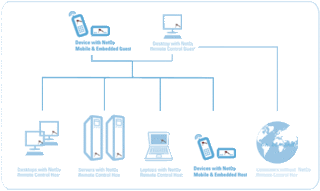
NetOp Remote Control is the latest version of our remote control software. It’s designed specifically to meet the needs of corporate business, and is packed with numerous features to help IT professionals get the most out of remote control technology. The NetOp Remote Control software is typically used for remote network management, remote system administration and in helpdesk environments.

NetOp Remote Control 9.0:

NetOp Remote Control version 9.0 in general contains all functions and platforms support available in NetOp Remote Control version 8.0. Here below are the new features in headlines, grouped by function:

Security
* Smart Card authentication - a Smart Card and a Smart Card reader at the Windows Guest is used in order for the Host to be able to authenticate the identity of the Guest user by communication with a Windows 2000/2003 Server with Microsoft CA installed or by communicating with a NetOp Security Server which in turn communicates with the CA.
* Password - the maximum password length has been extended to 64 bytes.
* Disconnect password - to prevent the Windows Guest user closing the session.
* Switch to window mode password - prevents the Windows Guest user from leaving full screen mode.
* Active Directory - computer support for new host object type for authorization in Security Server.
* Confirm Access - new flexible options in the Windows Host to adjust Confirm Access.

Session Types
* Video Chat - The Audio Chat session has been extended to allow a Windows Guest connecting to a Windows Host to use attached web cams to transmit own live video to the Host and receive the live video stream from the Host.
* Monitor Mode - allows a Windows Guest to cycle between Hosts with a fixed interval for e.g. surveillance of desktop activity.

Enhancements
* Snapshot - allows a Windows guest to save the current Host desktop image as a file.
* Service Ticket - now supported in Windows Host for supplying a one-off ticket number to the helpdesk.
* Scheduled cleanup - enables the Security Server to delete "Active Session" entries older than a predefined number of hours with balancing of the NetOp Log.
* Phonebook files - are now saved in XML format in order to ease interaction with other applications.
* Auto Take Control - makes it possible for a Guest user to quickly gain mouse and keyboard control from another Guest just by clicking the mouse or use the keyboard.
* Automatic reconnect - enables the Windows Guest to attempt to reconnect to the Host in case of disconnect.
* Connection attempts - the Windows Guest can control the number of retries used to connect.
* Hide Guest icon - for use in third party products the Windows Guest application and notification area icon can be hidden.

Installation
* Enhanced MSI support
o One MSI package per module.
o Optional setup program to install multiple modules and to install Windows Installer if not present.
o Editor to create transform files for customized installation.
o Supports Microsoft Active Directory deployment.
o NetOp Deployment Utility now supports NetOp MSI file deployment.

NetOp Deployment Utility
* Support for new predefined MSI/MST files.

download

UltraVNC 1.0.5


UltraVNC is an easy to use sotware that can display the screen of another computer (via internet or network) on your own screen. The program allows you to use your mouse and keyboard to control the other PC remotely. It means that you can work on a remote computer, as if you were sitting in front of it, right from your current location.

If you provide computer support, you can easy access your customer´s computers from anywhere in the world and resolve helpdesk issues remotely ! Your customers don´t have to pre-install software or execute complex procedures to get remote helpdesk support. UltraVNC allows you to remotely control a computer over any TCP/IP connection. UltraVNC emulates the destination computer to make it look as if you were in front of it

dowload

Radmin 3.2 Full Pack (Multilanguage)


Radmin (Remote Administrator) is fast and secure remote control and remote access software that enables you to work on a remote computer as if you were sitting right in front of it and access it from multiple places.

Radmin includes full support for Windows Vista (32-bit and 64-bit), file transfer, multi-user text and voice chats, Windows security, Kerberos authentication, 256-bit AES encryption for all data streams, telnet access, multiple monitors support and unique DirectScreenTransfer technology.

Radmin utilizes the ever-present TCP/IP protocol - the most widespread protocol used in LANs, WANs and the Internet. This means you can access your remote computer from anywhere in the world. Radmin is deployed on thousands of corporate PCs worldwide. Among our clients are companies where Radmin is the standard application for network management.

You view the remote computer screen on your own monitor either in a window or full screen. All your mouse movements and keyboard signals are transferred directly to the remote computer. Radmin enables you to work on a remote computer in real time as if you were using its own keyboard and mouse. According to our tests and user feedback, Radmin outperforms all other remote control software in speed, usability and features.

Homepage: http://www.radmin.com

Features:
-Full compatibility with Windows Vista 32-bit and 64-bit
-Highest Speed of Work
-Highest Security Level
-Multi-user Text and Voice Chat
-Multiple monitors support
-User-friendly interface
-File Transfer with "Delta Copy" feature
-Low System Requirements
-Multiple Connections Support

What's new in 3.2:
-Windows Server 2008 support.
-Windows Vista SP1 support.
-Left-handed mouse support.
-Speed Increase.
-27 Languages support.


download

Template by:
Free Blog Templates